
I have been a systems nerd since I was a little girl.
Like... the kind of kid who got genuinely excited about a new calendar at the start of each school year. I'd sit down and write in ALL the birthdays, holidays, and important dates before anything else. (Yes, I was that kid.)
By college, I had routines for everything. Study systems, cleaning rotations, daily checklists. Nothing – and I mean NOTHING – has ever been more satisfying to me than making a plan, writing a checklist, and crossing things off one by one.
So when I tell you that learning how to use Trello to organize my business was a game changer... I mean it in the most sincere way possible.
A quick heads up before we dive in: I originally wrote this post a few years ago when Trello was my main project management tool. I've since switched to Asana (I wrote a whole post about why if you want the behind-the-scenes), but Trello is STILL one of the first tools I recommend to entrepreneurs who are just getting started. The system I'm about to walk you through? Still works exactly the way I describe it. So if you're a Trello user – or just curious – this one's for you.

Why Trello in the First Place?
Here's the problem with paper planners alone – and I SAY this as someone who will never give up her paper planner...
They're great for your calendar + daily to-do list. But they are NOT great for storing recurring tasks, tracking ongoing projects, or capturing ideas that need to live somewhere until you're ready for them.
That's where Trello comes in.
Trello is basically a digital board with columns (called "lists") and individual cards inside each column. It's free to start, super visual, and VERY beginner-friendly. Think of it like sticky notes on a wall... but organized, searchable, and always with you.
For me, it was the tool that handled everything my paper planner couldn't. And together? They made my most productive combo.
How I Set Up My Trello Board
My board is divided into 9 sections – some for business, some for life – because if I'm being real, the two are not that separate when you're an entrepreneur and a mom.
Here's the full layout:
Goals
Operations
Marketing
Client Fulfillment
Ideas + Backburner
Routines
Chores
Lists
Important Docs
I'm a very compartmentalized person. Having everything in its own "bucket" means I always know exactly where to look – and I'm not trying to find anything in a pile of unrelated tasks. Let me walk you through each one.
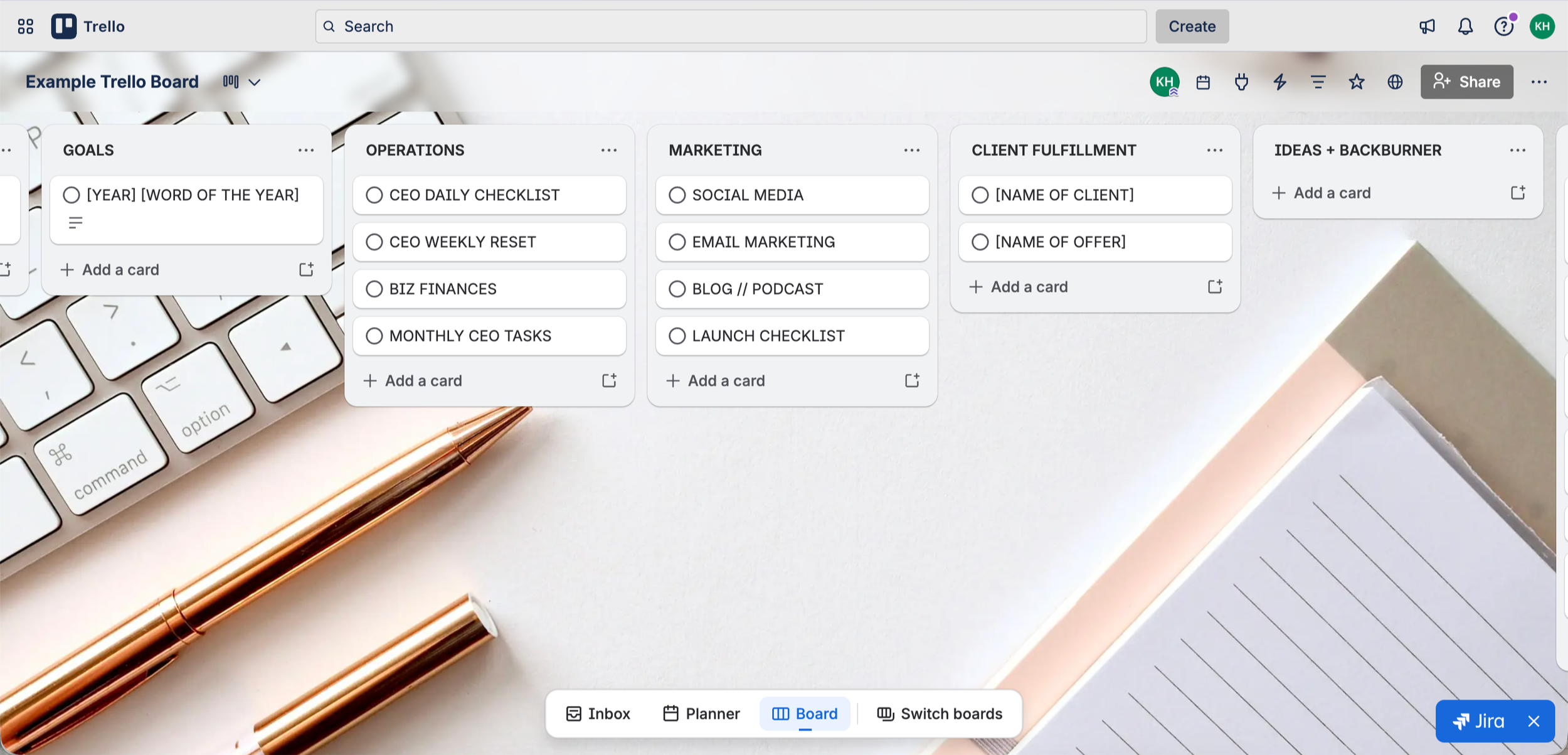
Goals
This column is your north star.
I keep one card here with my word of the year and my goals for the year. It's not a task list – it's a reminder of WHY I'm doing all of this in the first place. When I'm in the weeds on a random Tuesday, it helps to be able to glance at this and remember what I'm actually working toward.
Simple. One card. But it matters more than it looks.
Operations
This is where I keep everything that makes the business RUN.
Inside this column, I have cards for:
CEO Daily Checklist – my non-negotiable daily tasks
CEO Weekly Reset – the checklist I run through every Friday when I plan my week
Biz Finances – monthly financial tasks like reviewing numbers and paying contractors
Monthly CEO Tasks – the once-a-month things that are easy to forget but genuinely important
Think of Operations as everything behind the scenes that keeps you from dropping balls. It's not flashy, but it's the foundation.
Marketing
This is the column that directly grows your business... and honestly the one that gets the most action.
Cards in Marketing:
Social Media – recurring tasks and content tracking
Email Marketing – emails I need to write, send dates, sequence work
Blog // Podcast – content ideas, drafts in progress, post scheduling
Launch Checklist – when I'm in a launch, EVERYTHING goes here so nothing falls through the cracks
If you're not spending 80% of your working time on marketing-related tasks, your business growth is going to feel stuck. This column is how I make sure that doesn't happen.
Client Fulfillment
This is my "stuff I owe other people" section.
One card per client or offer. Inside each card is a checklist of everything I need to deliver for them – whether it's due today or three weeks from now. When someone is depending on me, it NEEDS to be written down with a due date.
My to-do list is always my first stop when I sit down to work, and client fulfillment is always the priority.
Ideas + Backburner
The shower idea section. (You know exactly what I mean.)
Any time I get a content idea, a business idea, something a client said that sparked something – it goes here immediately. I'm not ready to act on it yet, but I'm also NOT letting it disappear because I didn't write it down.
This section has saved more half-formed ideas than I can count.
Routines
This is where my recurring personal routines live – separate from business checklists so they don't get mixed together.
Morning routine, evening wind-down, whatever recurring personal rhythm I'm trying to maintain. Having it in Trello means I don't have to rebuild the checklist from scratch every time.
Chores
Yes, my cleaning schedule has its own column. And yes, it's changed my life.
My weekends are SACRED. I'm not spending Saturday morning scrubbing bathrooms when I could be with my kids. So instead, I do about 30 minutes of a different area each weekday – and this column keeps me on track.
(You can thank me later.)
Lists
Probably my favorite section, if I'm honest. And it's entirely personal.
TBR (to be read) list. Family movie list. Packing lists I reuse. Gift ideas when I think of them. Random things my brain needs to offload somewhere so I stop trying to remember them.
Because say it with me: if I don't write it down, I won't remember it.
Important Docs
This is basically my digital filing cabinet.
Links I need to access regularly, login info I can never remember, resources I keep having to hunt down. Instead of opening 47 tabs trying to find the same thing for the third time, it lives here.
Not the most exciting column on the board. But VERY satisfying when I actually need something and it takes 10 seconds to find.
A Few Things Worth Knowing
This is a task manager, not a calendar. My actual schedule lives in my Google Calendar and paper planner. Trello handles everything ELSE – the recurring tasks, the projects, the ideas, the stuff that doesn't fit in a time slot.
Start simple. When I first set up my board, I had it organized by day, which meant I was constantly moving cards around and couldn't find anything. The section-based setup I described above clicked way better for how my brain works. But you might need to experiment to find what works for yours.
Use it alongside your planner, not instead of it. The two tools do different things. Your planner keeps you on schedule. Trello keeps you from dropping balls.
Ready to Go Deeper?
If you've been using Trello for a while and feel like you might be outgrowing it – or if you're managing a team or a VA – that's actually exactly why I eventually made the switch to Asana. I wrote a full post about why I switched and how Asana compares, so check that out if you're curious.
But if you're just getting started with project management? Trello is a fantastic place to begin. It's free, it's visual, and it works.
And whatever digital tool you're using... it works best when it's paired with a solid weekly planning system. If you want to see how I plan my weeks from a goals-down perspective, the SYS Planner is what I use every single week to make sure I'm focused on the right things – not just keeping busy.
